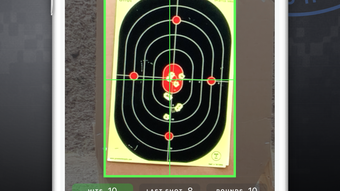

AccuShoot: Precision Training for Shooters
Is AccuShoot available for devices other than iPhone?
The developer did not specify compatibility beyond iPhone.
Is the app secure and private?
AccuShoot includes granular privacy management features to control data sharing.
Can I use AccuShoot without an internet connection?
Basic functionality may be available offline, but synchronization with the web app requires internet access.
How often are updates released?
Update frequency was not specified by the developer.
What type of license does AccuShoot use?
AccuShoot is offered as a free application with no subscription or in-app purchase details provided.
Overview
AccuShoot is a digital marksmanship training platform designed for shooters across skill levels, including law-abiding citizens, law enforcement, and military personnel. The software aims to modernize traditional shooting practice by replacing manual scorekeeping with automated, real-time performance tracking. By digitizing target scoring, session recording, and progress analysis, AccuShoot helps users identify patterns, refine techniques, and improve accuracy over time.
The app supports picture-based shooting sessions, allowing users to document and review each round with visual context. With a focus on data-driven improvement, AccuShoot enables users to track performance trends and set measurable goals. The integration between mobile and web platforms ensures that training data is accessible from any device, facilitating continuous learning.
While the developer did not provide additional details about the company’s background beyond the name, the app’s purpose is clear: to enhance marksmanship through structured, data-rich training. Real-world use cases include range practice, competitive preparation, and tactical skill development. The software is particularly suited for individuals who value precision, consistency, and long-term progress in shooting sports.
Key Features & Capabilities
- Real-time target scoring: Instantly record shot positions and calculate scores during live shooting sessions, reducing manual input errors.
- Digital recordkeeping: Automatically store session data, including time, date, weapon used, and environmental conditions, for future review.
- Advanced group analysis: Analyze shot dispersion patterns to identify consistency issues and improve aim precision.
- Performance prediction: Use historical data to forecast future performance trends based on training consistency.
- Social rankings: Compare personal performance against peers or community benchmarks to stay motivated.
- Picture-based sessions: Capture and annotate images of targets to correlate visual data with shot outcomes.
- Digital locker for gun comparison: Store and compare data across multiple firearms to evaluate performance differences.
- Granular privacy management: Control which data is shared, stored, or made public, supporting both personal and professional use cases.
These features collectively support a structured training workflow. For example, a law enforcement officer can use the app to log daily drills, analyze group patterns to detect trigger control inconsistencies, and compare weapon performance across duty and training firearms. Similarly, a competitive shooter may leverage social rankings and performance prediction to prepare for tournaments.
The digital locker allows users to maintain a library of weapon-specific data, enabling long-term comparisons. All features are designed to reduce cognitive load during training and provide actionable insights after the session. The seamless synchronization between iPhone and web platforms ensures that users can access their training history from any device, supporting both on-site and remote analysis.
User Interface, Workflow & Performance
AccuShoot’s interface is designed for intuitive navigation on iPhone, prioritizing quick access to core functions during active shooting sessions. The layout emphasizes clarity, with dedicated sections for session initiation, target upload, scoring, and data review. Navigation is streamlined through a bottom menu bar, allowing users to switch between key modules with minimal taps.
The workflow follows a logical sequence: start a session, capture a target image, score shots, and save results. The app’s performance is optimized for mobile use, ensuring responsive interactions during fast-paced training. While the developer did not specify resource usage details, the 28.6 MB installation size suggests a lightweight footprint.
General software behavior patterns indicate efficient CPU and RAM handling, though actual performance may vary based on device hardware. Stability appears to be a priority, as the app supports continuous session tracking without reported crashes. The digital locker and privacy controls are integrated into the main menu, allowing users to manage data access without disrupting the training flow.
Overall, the user experience is tailored for practicality and speed, minimizing distractions during critical moments of practice.
Compatibility & System Requirements
AccuShoot is designed exclusively for iPhone devices and runs on version 1.0.0 of the application. The installation size is 28.6 MB, which is relatively compact for a feature-rich mobile app. Platform compatibility information is limited to iPhone, with no details provided about specific iOS versions or hardware requirements.
The developer did not specify exact system requirements, including minimum RAM, processor speed, or storage space beyond the app size. As such, compatibility with older or newer iPhone models remains unclear. Users should ensure their device supports the latest iOS updates to maintain optimal performance.
While the app is designed for mobile use, synchronization with the web app requires a stable internet connection. For users seeking broader device support, the developer did not indicate plans for Mac, Windows, or other platforms. The lack of detailed technical specifications limits the ability to assess full compatibility across the iPhone ecosystem.
Pros and Cons
Pros
- Real-time scoring reduces errors and speeds up session processing.
- Comprehensive digital recordkeeping enables long-term performance tracking.
- Advanced group analysis provides actionable insights into shooting consistency.
- Seamless synchronization between iPhone and web apps for cross-device access.
- Granular privacy controls enhance data security and user confidence.
- Free to download and use, with no reported in-app purchases.
Cons
- Compatibility limited to iPhone; no support for other platforms.
- Exact system requirements were not listed.
- Performance details on CPU or RAM usage were not provided.
- Update frequency and future feature roadmap remain unknown.
- Web app functionality and features were not described.
Final Thoughts
AccuShoot delivers a focused, data-driven approach to marksmanship training, offering a modern alternative to traditional scorekeeping. Its combination of real-time scoring, advanced analytics, and cross-device synchronization makes it a valuable tool for shooters committed to continuous improvement. The inclusion of privacy controls and a free pricing model enhances accessibility and trust.
While platform limitations and incomplete technical details prevent a full assessment of performance and compatibility, the app’s core functionality is well-executed and purpose-built. Law enforcement, military personnel, and competitive shooters will find significant value in its structured training environment. For individuals seeking a reliable, secure, and intelligent way to track shooting progress, AccuShoot stands out as a practical solution.
Download AccuShoot now.







